WalletAccount
Use wallets to sign transactions in your DAPP.
The WalletAccountV6 class is similar to the regular Account class, with the added ability to ask a browser wallet to sign and send transactions. Some other cool functionalities will be detailed hereunder.
The private key of a WalletAccountV6 is held in the Wallet, so any signature is managed by the wallet. With this approach DAPPs don't need to manage the security for any private key.
Use WalletAccountV6 (get-starknet v6) in every new DAPP. It extends WalletAccountV5 (get-starknet v5), so everything in the usage section applies to both, and it adds the STRK20 privacy protocol.
This class functions only within the scope of a DAPP. It can't be used in a Node.js script.
Architecture
In your DAPP, you have to use the get-starknet library to select and interact with a wallet.

When retrieving information from Starknet, a WalletAccountV6 instance will read directly from the blockchain. That is why at the initialization of a WalletAccountV6 a provider is a required parameter — either ProviderOptions (e.g. { nodeUrl }) or a ProviderInterface instance such as RpcProvider. It will be used for all reading activities.
With get-starknet v6
WalletAccountV6 is the recommended class for new DAPPs. It extends WalletAccountV5 with support for the STRK20 privacy protocol — a privacy layer for token operations using zero-knowledge proofs.
When retrieving information from Starknet, a WalletAccountV6 instance reads directly from the blockchain via its provider. If you want to write to Starknet, WalletAccountV6 asks the wallet to sign and send the transaction using the Starknet Wallet API.
WalletAccountV6 requires get-starknet v6 (v6.0.6 min).
Select a Wallet
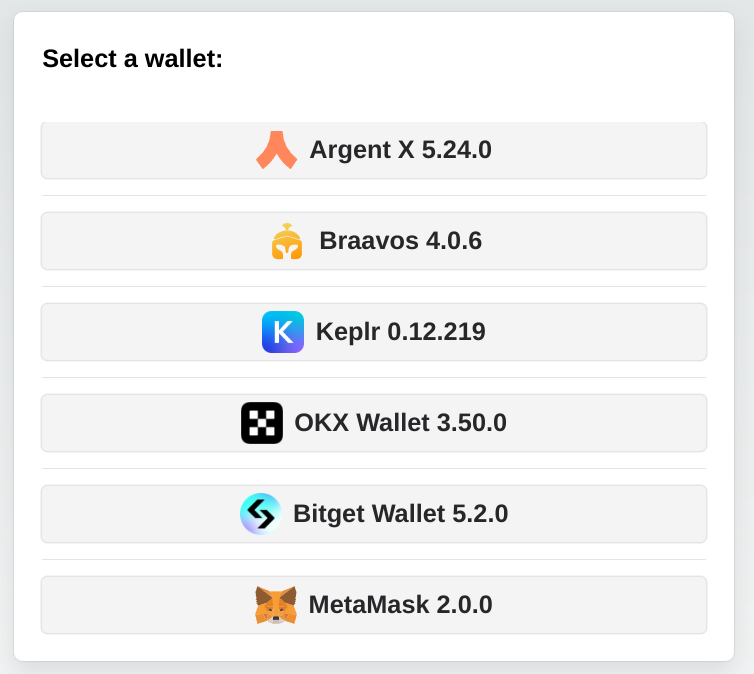
As several wallets can be installed in your desktop/mobile, WalletAccountV6 needs one of the available wallets. Using the @starknet-io/get-starknet-discovery v6 library, you get the list of available wallets, and you have to create your own UI and logic to select one of them. A wallet is a WalletWithStarknetFeatures Object.
An example in a DAPP: here. In this example you can select only the wallets compatible with the Starknet Wallet API.
Instantiating a new WalletAccountV6:
import { createStore, type Store } from '@starknet-io/get-starknet-discovery'; // v6.0.6 min
import { type WalletWithStarknetFeatures } from '@starknet-io/get-starknet-wallet-standard/features'; // v6
import { WalletAccountV6, walletV6 } from 'starknet';

const myFrontendProviderUrl = 'https://api.zan.top/public/starknet-sepolia/rpc/v0_10';
const store: Store = createStore();
const walletsList: WalletWithStarknetFeatures[] = store.getWallets();
// A wallet that does not answer to the Starknet Wallet API is not compatible:
async function isCompatible(wallet: WalletWithStarknetFeatures): Promise<boolean> {
  try {
    await walletV6.getPermissions(wallet);
    return true;
  } catch {
    return false;
  }
}
const areCompatible: boolean[] = await Promise.all(walletsList.map(isCompatible));
const compatibleWallets = walletsList.filter((_wallet, index) => areCompatible[index]);
// Create your own component to select one of these wallets.
// Hereunder, selection of the first compatible wallet.
const selectedWallet: WalletWithStarknetFeatures = compatibleWallets[0];
const myWalletAccount: WalletAccountV6 = await WalletAccountV6.connect(
  { nodeUrl: myFrontendProviderUrl },
  selectedWallet
);
A wallet can appear after the creation of the store. In this case, getWallets() does not return it yet.
To know when the list of wallets changes, give a function to store.subscribe(). The store calls this function each time the list changes, and gives it the new list:
const unsubscribe = store.subscribe((wallets) => {
  console.log('Wallets available now:', wallets);
});
// To stop receiving the new lists:
unsubscribe();
But the store does not report a wallet that adds itself to the page (window.starknet...) after the creation of the store. The example DAPP above shows how to search again in this case.
The wallet is connected to this blockchain to write in Starknet:
const writeChainId = await walletV6.requestChainId(selectedWallet);
and to this blockchain to read Starknet:
const readChainId = await myWalletAccount.provider.getChainId();
Subscription to events
You can subscribe to one event with get-starknet v6:
onChange: Triggered each time you change the current account or the current network in the wallet.
Each account of the event has a chains list. The first chain looks like starknet:0x534e5f5345504f4c4941. The function getStarknetChainId() returns the chain ID from this text: 0x534e5f5345504f4c4941.
An example in a DAPP: here.
import { useCallback, useEffect } from 'react';
import { validateAndParseAddress } from 'starknet';
import type { StandardEventsChangeProperties } from '@starknet-io/get-starknet-wallet-standard/features';
import { getStarknetChainId } from '@starknet-io/get-starknet-wallet-standard/chains';

const handleChange = useCallback((change: StandardEventsChangeProperties) => {
  console.log('Event detected', change.accounts);
  if (change.accounts?.length) {
    setCurrentAccount(validateAndParseAddress(change.accounts[0].address)); // from a React useState
    setCurrentChainId(getStarknetChainId(change.accounts[0].chains[0])); // from a React useState
  }
}, []);

useEffect(() => {
  console.log('Subscribe events...');
  myWalletAccount?.onChange(handleChange);
  return () => {
    console.log('Unsubscribe to events...');
    myWalletAccount?.unsubscribeChange();
  };
}, [myWalletAccount, handleChange]);
STRK20 privacy protocol
STRK20 is a note-based privacy pool for ERC-20 assets: a single pool contract holds the deposited tokens, but inside the pool funds are encrypted notes, so observers can't tell who owns what. Every state change is backed by a zero-knowledge proof verified on-chain. The mental model is: deposit (shield) → transact privately inside the pool → withdraw (unshield). The wallet holds the private state and generates the proof; your DAPP only describes the actions it wants.
As of 2026-08, the Ready and Xverse wallets support the STRK20 wallet API.

Reading the diagram: a solid arrow is an action your DAPP declares in its STRK20_ACTION[]; a dotted arrow is infrastructure work the pool and the wallet do for you, and the green box is infrastructure driven by the pool: only the pool can make it execute anything, though your DAPP may freely query its read-only views (see Address of a shadow account). Purple boxes are shielded — observers see that the pool changed state, not who owns what. Grey boxes are ordinary public on-chain activity: a shadow account holds public ERC-20 funds, and its privacy comes solely from the fact that its address cannot be linked back to you. The open note is the in-between case: it lives in the pool, but filling it publishes the amount it received.
WalletAccountV6 exposes four dedicated methods for these operations, plus executeWithProof().
STRK20 actions
A DAPP describes what it wants with an array of STRK20_ACTION. There are exactly five action types:
Action type | Fields | Effect |
|---|---|---|
"deposit" | token, amount | Public funds → pool (always to self). |
"withdraw" | token, amount, recipient | Pool → public recipient address. |
"transfer" | token, amount (FELT or "OPEN"), recipient | Private transfer inside the pool to another registered user. |
"invoke" | contract, calldata | Calls an invoke helper contract, executed by the pool. |
"shadow_account_invoke" | dapp_name, nonce, calls, collect_policy | Calls contracts through the user's shadow account for this DAPP. |
amount is always expressed in the token's smallest unit.
amount: "OPEN""OPEN" is only meaningful inside a multi-action transaction. It creates an empty open note whose value is unknown at build time (e.g. the output of an AMM swap) and is filled later in the same transaction by a paired invoke or shadow_account_invoke action. It is never used on its own.
A simple deposit, for example:
import type { STRK20_ACTION } from 'starknet';

const actions: STRK20_ACTION[] = [
  {
    type: 'deposit',
    token: '0x04718f5a0fc34cc1af16a1cdee98ffb20c31f5cd61d6ab07201858f4287c938d', // STRK
    amount: '0xde0b6b3a7640000', // 1e18, smallest unit
  },
];
The invoke helper
An invoke action does not call a protocol directly. Its contract field points at an invoke helper: a small dedicated contract, written and audited for one single operation of one protocol (an Ekubo swap, a Vesu deposit…). The pool sends the input to the helper, calls it, and collects the proceeds — all inside the same transaction.
A helper follows a fixed convention: it exposes a privacy_invoke entry point, the last felt of its calldata is always the id of the open note to fill, and it measures its own output as a balance delta before handing it back to the pool. It holds nothing between transactions, and it is shared by every user — so the protocol always sees the same caller address, whoever you are. That is exactly what makes this path anonymous.
Since your DAPP knows neither the pool address nor the id of the open note when it builds the action, the calldata accepts placeholders, which the wallet substitutes while assembling the actions:
| Placeholder | Substituted with |
|---|---|
${poolAddress} | The privacy pool contract address — which is also the caller the helper sees. |
${openNoteIds[N]} | The id of the Nth open note of the transaction, i.e. the Nth transfer with amount: "OPEN" (zero-based). |
A calldata item is therefore a STRK20_CALLDATA_ITEM, that is a felt or a STRK20_CALLDATA_PLACEHOLDER. Pass placeholders as raw strings, exactly as written above: do not compile or normalize them, or the wallet will not recognize them.
The classic three-action shape — fund the helper, create the note that will receive the output, run the operation:
const actions: STRK20_ACTION[] = [
  // 1. Send the input token from the shielded balance to the helper:
  { type: 'withdraw', token: strkAddress, amount: '0x2386f26fc10000', recipient: helperAddress },
  // 2. Create the open note that will receive the output token:
  { type: 'transfer', token: usdcAddress, amount: 'OPEN', recipient: myAddress },
  // 3. Run the operation:
  {
    type: 'invoke',
    contract: helperAddress,
    calldata: [usdcAddress, minAmountOut, '${poolAddress}', '${openNoteIds[0]}'],
  },
];
The number of open notes created by transfer actions must match the number filled by the invoke. Otherwise the wallet rejects the request with INVALID_REQUEST_PAYLOAD, before generating any proof.
Helper or shadow account?
Both run calls on your behalf without revealing who you are, but they are not interchangeable:
invoke(helper) | shadow_account_invoke(shadow account) | |
|---|---|---|
| Best suited to | Atomic operations: swap, lending round-trip | Positions held over time, rewards, DAPPs recognizing a returning user |
| Contract | One dedicated helper per operation, someone has to write it | Generic infrastructure, nothing to write |
| Caller seen by the protocol | The shared helper address, identical for every user | Your own stable pseudonymous address |
| State | None: input consumed and output returned in the same transaction | A public balance that persists across transactions |
| Payload | Raw felts and placeholders, following the helper ABI | Structured calls, any contract and entrypoint |
A transaction has a single invoke slot, so the two are mutually exclusive: one or the other, never both.
Get STRK20 balances
import type { STRK20_BALANCE_ENTRY } from 'starknet';

const balances: STRK20_BALANCE_ENTRY[] = await myWalletAccount.strk20Balances([
  '0x04718f5a0fc34cc1af16a1cdee98ffb20c31f5cd61d6ab07201858f4287c938d', // STRK token address
]);
console.log('balance =', balances[0].balance);
Submitting a STRK20 transaction
Three methods, but one of them is the answer almost every time. They differ only on who submits the transaction, and therefore who pays the fee:
| Method | Submits and pays | Use it |
|---|---|---|
strk20InvokeTransaction(actions) | The wallet — it adds the fee action by itself | Almost always. |
strk20PrepareInvoke(actions) | Your DAPP — the wallet adds no fee action | To sponsor the fee for your user, or to estimate it beforehand |
executeWithProof(call, proof) | The wallet | To submit a prepared call through the wallet after all |
The default. One call, and the wallet does everything: approval UI, proof, fee, submission.
const result = await myWalletAccount.strk20InvokeTransaction(actions);
console.log('transaction hash =', result.transaction_hash);
Generating the ZK proof makes this call much slower than an ordinary invoke, and the user has to approve it. Tell them in your UI, or your DAPP will look frozen.
Sponsoring the fee. strk20PrepareInvoke() builds the call and its proof without submitting anything, and without adding a fee action — whoever submits pays. Your DAPP submits it with an account of its own, and the user pays nothing:
import type { STRK20_CALL_AND_PROOF } from 'starknet';

const { call, proof }: STRK20_CALL_AND_PROOF = await myWalletAccount.strk20PrepareInvoke(actions);
// `call` is a standard Starknet.js `Call`, submittable by any account:
const result = await mySponsorAccount.execute(call, {
  proof: proof.data,
  proofFacts: proof.proof_facts,
});

// ...or hand it back to the wallet instead of paying yourself:
const resp = await myWalletAccount.executeWithProof(call, proof);
Estimating first. With simulate: true the wallet skips the expensive proof generation and returns the same call with an empty proof — enough to estimate the fee or preview the operation, but not submittable:
const simulated = await myWalletAccount.strk20PrepareInvoke(actions, true);
const fee = await mySponsorAccount.estimateInvokeFee(simulated.call);
STRK20 shadow accounts
A shadow account is a persistent, pseudonymous identity that a user owns for one specific DAPP. It is derived from (user, dapp_name, nonce), deployed lazily at a deterministic address on first use, and driven exclusively through the pool. Each nonce gives the user a distinct shadow account for the same DAPP, so they can compartment their activity.
A shadow account holds public ERC-20 funds: its balance and its transactions are visible on-chain like any other address. The privacy it provides is the unlinkability between that address and the user's main address — not the shielding of its content. It is also not an account contract: it has no keys, and only the shadow account anonymizer can execute through it.
A shadow account is funded from the shielded balance with a withdraw action, and the proceeds of its calls are collected back into an open note, according to collect_policy:
collect_policy | Effect |
|---|---|
{ type: 'all' } | Collects the entire token balance of the shadow account. |
{ type: 'diff' } | Collects only the balance gained during this interaction. |
{ type: 'exact', amount } | Collects exactly amount. |
import type { STRK20_ACTION } from 'starknet';

const actions: STRK20_ACTION[] = [
  // 1. Fund the shadow account from the shielded balance:
  {
    type: 'withdraw',
    token: strkAddress,
    amount: '0x4563918244f40000',
    recipient: shadowAccountAddress,
  },
  // 2. One open note per expected output token:
  { type: 'transfer', token: strkAddress, amount: 'OPEN', recipient: myAddress },
  // 3. The calls, executed by the shadow account:
  {
    type: 'shadow_account_invoke',
    dapp_name: 'myDapp',
    nonce: '0x0',
    calls: [myContract.populate('stake', { amount: 1000n })],
    collect_policy: { type: 'all' },
  },
];
const result = await myWalletAccount.strk20InvokeTransaction(actions);
Note that calls holds standard Starknet.js Call objects, exactly as returned by myContract.populate().
Shadow account commitment
A DAPP can recognize a returning user through the commitment of their shadow accounts. The wallet computes it locally, without sending any transaction:
// Full commitment of one shadow account:
const commitment = await myWalletAccount.strk20ShadowAccountCommitment('myDapp', '0x0');

// Partial commitment, shared by every shadow account this user derives for this DAPP:
const partial = await myWalletAccount.strk20ShadowAccountCommitment('myDapp');
Omitting nonce is not the same as passing '0x0'. Without a nonce, you get the partial commitment, which lets a DAPP recognize all the shadow accounts of a user without learning any individual nonce. With a nonce, you get the commitment of that one shadow account.
Address of a shadow account
Most DAPPs never need it: a shadow_account_invoke action is self-contained — dapp_name and nonce are enough for the wallet to route the calls. You need the address only when you have to name the shadow account from the outside: funding it through the recipient of a withdraw action, or passing it in the calldata of one of your contracts.
The commitment returned above is exactly the salt of the shadow account deterministic deployment. Computing the address also requires the anonymizer address and the SubAccount class hash, and no wallet API method returns either — they come from the chain, not from the wallet.
The shadow account anonymizer is the contract that deploys and drives shadow accounts on behalf of the pool. Its address is the one constant your DAPP has to know:
| Network | Shadow account anonymizer |
|---|---|
| Mainnet | 0x04f33230dc57855c6e7eabe66dfa0fde82c5458fd0e54827cdb7cb4c474888a7 |
| Sepolia | 0x010a2285310c107c731d997afc147afb7495daff6397c2d242133d9fe8d9b147 |
Do not hardcode the class hash: the anonymizer exposes it, so reading it from there keeps your DAPP correct across upgrades of the shadow account contract.
const anonymizer = new Contract({
  abi,
  address: ANONYMIZER_ADDRESS,
  providerOrAccount: myProvider,
});
const shadowAccountClassHash = await anonymizer.get_shadow_account_class_hash();
Read it once and keep it — deriving addresses from it is then offline, with no further RPC call:
import { hash } from 'starknet';

const commitment = await myWalletAccount.strk20ShadowAccountCommitment('myDapp', '0x0');
const shadowAccountAddress = hash.calculateContractAddressFromHash(
  commitment, // the commitment is the deployment salt
  shadowAccountClassHash,
  [], // the SubAccount constructor takes no argument
  ANONYMIZER_ADDRESS
);
The same anonymizer also exposes a view that scans a range of nonces, which additionally tells you whether each shadow account is already deployed. It takes the partial commitment:
const partial = await myWalletAccount.strk20ShadowAccountCommitment('myDapp');

// nonces 0 to 4 — the range is limited to 1024 nonces per call.
// Last argument: true stops at the first undeployed nonce and returns only the
// contiguous deployed prefix, false resolves every nonce of the range.
const shadowAccounts = await anonymizer.get_shadow_accounts(partial, 0, 5, false);
// each entry = { nonce, address, is_deployed }
Both routes return the same address. Once you hold the class hash the offline one costs nothing and works before the shadow account exists; the view is useful to know which nonces the user has already activated.
A shadow account is deployed lazily, on its first shadow_account_invoke. Its address is deterministic and therefore known — and fundable — before it exists on-chain.
With get-starknet v5
WalletAccountV5 is the previous version of the class. Use it only if your DAPP is still on get-starknet v5, otherwise use WalletAccountV6.
When retrieving information from Starknet, a WalletAccountV5 instance will read directly from the blockchain. That is why at the initialization of a WalletAccountV5 a provider is a required parameter — either ProviderOptions (e.g. { nodeUrl }) or a ProviderInterface instance such as RpcProvider. It will be used for all reading activities.
If you want to write to Starknet the WalletAccountV5 will ask the wallet to sign and send the transaction using the Starknet Wallet API to communicate.
As several wallets can be installed in your desktop/mobile, the WalletAccountV5 needs one of the available wallets. You can ask get-starknet v5 to provide a list of available wallets, and you have to select one of them, called a WalletWithStarknetFeatures Object.
Select a Wallet
Using the @starknet-io/get-starknet-discovery v5 library you have to create your own UI and logic to select one of the available wallets. An example in a DAPP: here. In this example you can select only the wallets compatible with the Starknet Wallet API.
Instantiating a new WalletAccountV5:
import { createStore, type Store } from '@starknet-io/get-starknet-discovery'; // v5.0.0 min
import { type WalletWithStarknetFeatures } from '@starknet-io/get-starknet-wallet-standard/features'; // v5
import { WalletAccountV5, walletV5 } from 'starknet'; // v11
const myFrontendProviderUrl = 'https://api.zan.top/public/starknet-sepolia/rpc/v0_10';
const store: Store = createStore();
const walletsList: WalletWithStarknetFeatures[] = store.getWallets();
// A wallet that does not answer to the Starknet Wallet API is not compatible:
async function isCompatible(wallet: WalletWithStarknetFeatures): Promise<boolean> {
  try {
    await walletV5.getPermissions(wallet);
    return true;
  } catch {
    return false;
  }
}
const areCompatible: boolean[] = await Promise.all(walletsList.map(isCompatible));
const compatibleWallets = walletsList.filter((_wallet, index) => areCompatible[index]);
// Create your own component to select one of these wallets.
// Hereunder, selection of the first compatible wallet.
const selectedWallet: WalletWithStarknetFeatures = compatibleWallets[0];
const myWalletAccount: WalletAccountV5 = await WalletAccountV5.connect(
  { nodeUrl: myFrontendProviderUrl },
  selectedWallet
);
The wallet is connected to this blockchain to write in Starknet:
const writeChainId = await walletV5.requestChainId(selectedWallet);
and to this blockchain to read Starknet:
const readChainId = await myWalletAccount.provider.getChainId();
Subscription to events
You can subscribe to one event with get-starknet v5:
onChange: Triggered each time you change the current account or the current network in the wallet.
Each account of the event has a chains list. The first chain looks like starknet:0x534e5f5345504f4c4941. The function getStarknetChainId() returns the chain ID from this text: 0x534e5f5345504f4c4941.
An example in a DAPP: here.
import { useCallback, useEffect } from 'react';
import { validateAndParseAddress } from 'starknet';
import type { StandardEventsChangeProperties } from '@starknet-io/get-starknet-wallet-standard/features';
import { getStarknetChainId } from '@starknet-io/get-starknet-wallet-standard/chains';

const handleChange = useCallback((change: StandardEventsChangeProperties) => {
  console.log('Event detected', change.accounts);
  if (change.accounts?.length) {
    setCurrentAccount(validateAndParseAddress(change.accounts[0].address)); // from a React useState
    setCurrentChainId(getStarknetChainId(change.accounts[0].chains[0])); // from a React useState
  }
}, []);

useEffect(() => {
  console.log('Subscribe events...');
  myWalletAccount?.onChange(handleChange);
  return () => {
    console.log('Unsubscribe to events...');
    myWalletAccount?.unsubscribeChange();
  };
}, [myWalletAccount, handleChange]);
WalletAccount usage
Use as an Account
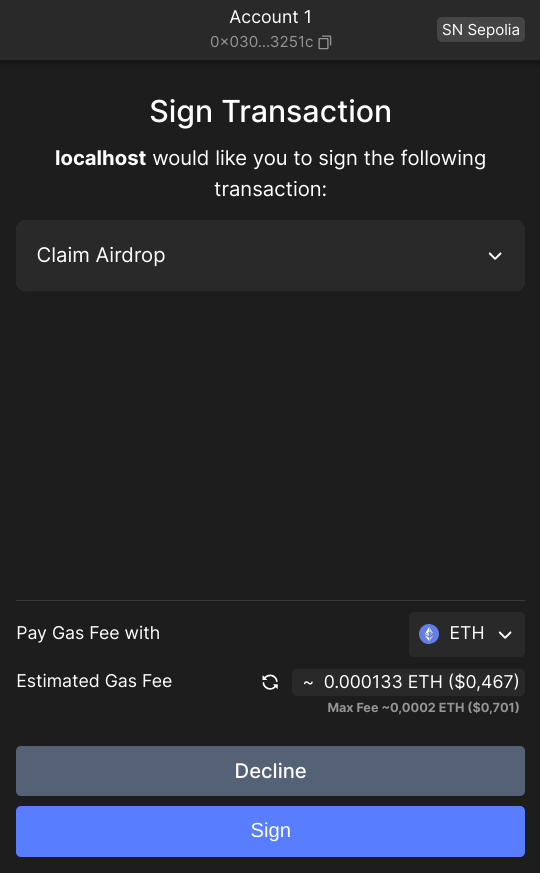
Once a new WalletAccountV6 or WalletAccountV5 is created, you can use all the power of Starknet.js, exactly as a with a normal Account instance, for example myWalletAccount.execute(call) or myWalletAccount.signMessage(typedMessage):
const claimCall = airdropContract.populate('claim_airdrop', {
  amount: amount,
  proof: proof,
});
const resp = await myWalletAccount.execute(claimCall);
Use in a Contract instance
You can connect a WalletAccountV6 with a Contract instance. All reading actions are performed by the provider of the WalletAccountV6, and all writing actions (that need a signature) are performed by the wallet.
const lendContract = new Contract({
  abi: contract.abi,
  address: contractAddress,
  providerOrAccount: myWalletAccount,
});
const qty = await lendContract.get_available_asset(addr); // use of the WalletAccountV6 provider
const resp = await lendContract.process_lend_asset(addr); // use of the wallet
Use as a Provider
The provider of your WalletAccountV6 instance is available as myWalletAccount.provider:
const bl = await myWalletAccount.provider.getBlockNumber();
// bl = 2374543
You can use all the methods of the RpcProvider class. Under the hood, this provider uses the RPC node that you indicated at the instantiation of the WalletAccountV6.
Direct access to the wallet API entry points
The WalletAccountV6 class is able to interact with all the entrypoints of the Starknet Wallet API, including some functionalities that do not exists in the Account class.
A full description of this API can be found here.
Some examples:
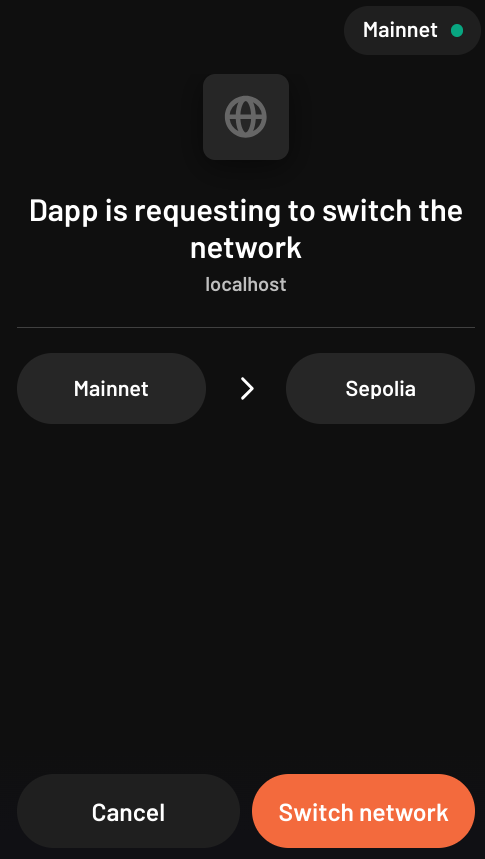
Request to change the wallet network
Using your WalletAccountV6, you can ask the wallet to change its current network:
useEffect(
  () => {
    if (!isValidNetwork()) {
      const tryChangeNetwork = async () => {
        await myWalletAccount.switchStarknetChain(constants.StarknetChainId.SN_SEPOLIA);
      };
      tryChangeNetwork().catch(console.error);
    }
  },
  [chainId] // from a networkChanged event
);
Request to display a token in the wallet
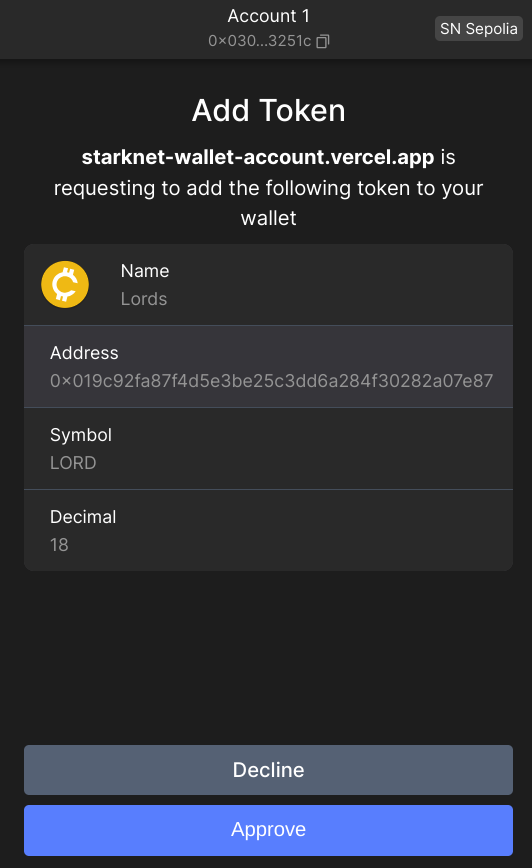
Using your WalletAccountV6, you can ask the wallet to display a new token:
useEffect(
  () => {
    const fetchAddToken = async () => {
      const resp = await myWalletAccount.watchAsset({
        type: 'ERC20',
        options: {
          address: erc20Address,
        },
      });
    };
    if (isAirdropSuccess) {
      fetchAddToken().catch(console.error);
    }
  },
  [isAirdropSuccess] // from a React useState
);
Changing the network or account
When you change the network or the account address a WalletAccountV6 instance is automatically updated, however, this can lead to unexpected behavior if one is not careful (reads and writes targeting different networks, problems with Cairo versions of the accounts, ...).
It is strongly recommended to create a new WalletAccountV6 instance each time the network or the account address is changed.